

Frame Share
sharing just a part of your screen
Attention: This page contains partner and advertising links. Therefore this page is to be understood entirety as an advertisement!
There are these small everyday problems that follow you around for years without you ever really tackling them. Mine was: in video calls and screen recordings I only ever wanted to share a specific region of my screen. Not the whole monitor with all its mails, notifications and the URL sitting right there in the browser tab. Not just a single window either, which macOS can share but which gets fiddly the moment you switch windows. Just a freely chosen area. A rectangle. Nothing more.
The short story of how that wish turned into a finished app on the Mac App Store is wonderfully silly. Here is the longer one.
Anyone who shares their screen regularly knows the dilemma. Share the whole monitor and the other side sees every notification, every open app, every private tab. Share just a single window and you are locked in: the moment you want to show something next to it, a second app, a terminal, a PDF, you have to awkwardly switch around. What I was missing all this time was the middle ground: a frame I place somewhere on the screen, freely adjust in size and position, that then broadcasts exactly that area. Everything inside the frame is visible, everything outside stays my own business.
Sounds trivial. It basically is. But none of the standard built-in tools solved it in a way that made me happy.
I am the kind of person who happily pays for good software. So I went looking and actually found two tools that did roughly what I wanted: RegionShare and ZoneShare. I decided to go for ZoneShare. Credit card out, checkbox ticked, clicked “Buy", and nothing happened. The button was simply dead. No cart, no error message, nothing at all. I tried everything: a different browser, cleared the cache, came back later.
So there you sit. Actively trying to give someone money, and the software won't let you. There is this moment where frustration turns into pure stubbornness, and that was the moment. I thought: “If you don't want my money, I'll just build the thing myself."
I have been building software for years, but native macOS apps in Swift are honestly not my daily bread. That is exactly where it got interesting: I set up the project together with AI and grew a complete, native macOS application piece by piece. Through Lulububu Software GmbH it turned into a proper little product, including a Jira project, clean versioning and a release on the Mac App Store.
The astonishing part wasn't that it worked, but how fast. From “I just want to share a rectangle" to a running app with monitor selection, menu bar integration and a proper permissions workflow was a surprisingly short path. The AI took the Swift quirks off my plate, I provided the architecture and the product decisions. A rather pleasant division of labour.
The principle is deliberately kept simple, because that was the whole point:
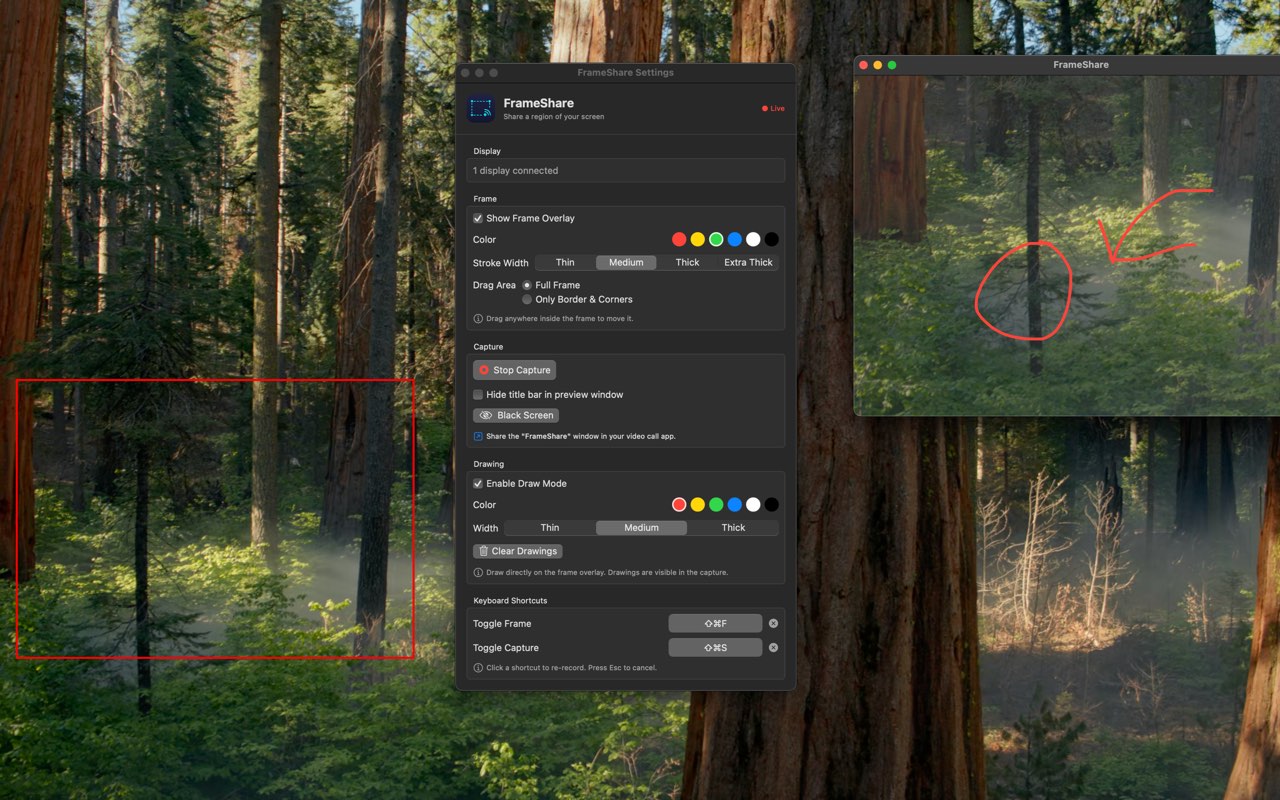
You place a frame on a freely chosen monitor, drag it to the size you want and move it to the right spot. The corners have handles that make it comfortable to grab and reposition. One click on “Start sharing" in the menu bar, and from then on only the area behind the frame is broadcast as its own source. In any app that can capture a screen source: Zoom, Teams, OBS, whatever. Everything outside the frame stays invisible.
Under the hood Frame Share consistently relies on native macOS frameworks. The actual capture runs through Apple's modern screen capture APIs, and the menu bar integration and window management are native too. That keeps the app lean and makes it feel like a real part of the system rather than a web window in disguise.
For an app to record the screen, macOS requires the corresponding permission. Instead of leaving you alone with a cryptic system dialog, Frame Share walks you through a small workflow: it explains why the permission is needed and takes you to the right spot in System Settings. Privacy was the core of the idea from the start, so the setup path should be honest and easy to follow too.
As it goes when you build a tool yourself and then suddenly use it every day: you get ideas. Over time the minimal rectangle gained a few conveniences I no longer want to miss:
A drawing mode that lets me annotate directly on the shared image, for example to point at something during a presentation. A switch that shows the frame automatically on startup. Freely assignable keyboard shortcuts to toggle the frame and the capture in an instant. And a setting that locks moving and resizing while a broadcast is running, so you don't accidentally reveal the wrong area. All little things that came straight out of actually using it.
So out of a broken buy button a published product was actually born. Frame Share is now officially available on the Mac App Store: Frame Share - Region Sharing. If you have the same problem I had back then, give it a try. And if something is missing: I use the app myself every day, so new ideas tend to land on the list rather reliably.
The moral of the story? Sometimes the fastest route to the right software isn't the buy button, but a weekend, a good idea and an AI model that takes care of the boring parts.