Receiptsy
turning Etsy orders into finished PDF invoices
Attention: This page contains partner and advertising links. Therefore this page is to be understood entirety as an advertisement!
For a while now I have been selling on Etsy under the name Bastelsaal. Not an empire, but a very modest shop with a single product: an adapter that connects the DJI Osmo Pocket 3 and 4 to the Elgato Prompter. It exists because I needed exactly that part myself and nobody sold it. So I designed it, 3D-printed it, and eventually thought: somebody else probably needs this too.
What I completely underestimated: the hard part of running a tiny shop like this is not the product. It is the invoice.
Etsy is a marketplace, not an accounting system. It does not give you a proper outgoing invoice for your sales - nothing you could hand to your accountant or send to a customer. What you get is a CSV file: the "Sold order items" export (the file is called EtsySoldOrderItems), one row per item sold, with price, shipping, discount and delivery address. Useful, but it is a spreadsheet, not a document.
In the beginning I did what most people probably do: a Word template, and then typing name, address, item, price and shipping cost by hand for every single order. That works for three orders a month. At thirty it costs you an entire evening of your life - and every time there is a good chance a digit slips somewhere. This is precisely the kind of work computers were invented for.
The point where a simple mail-merge solution falls apart for good is VAT. Because an Etsy invoice does not look the same for every order. What it has to look like depends on where the parcel goes. My adapters end up in Germany, all over Europe, and regularly in the US, the UK or Thailand - which means one single CSV export contains four different cases at once:
Domestic. Delivery inside Germany, 19 % German VAT. The easy one.
EU below the distance-selling threshold. As long as your sales to private customers in other EU states stay below the 10,000 Euro threshold, even the order to Amsterdam is invoiced with German VAT.
EU above the threshold (OSS). Once you cross it, the rate of the destination country applies, declared through the One-Stop-Shop scheme. And those rates differ wildly: 17 % in Luxembourg, 21 % in the Netherlands, 23 % in Poland, 27 % in Hungary.
Third country. If the parcel goes to Switzerland, the UK or the US, it is a tax-exempt export delivery - zero percent, but with the right note on the invoice.
On top of that comes the German small business regulation (Paragraph 19 UStG): if you use it, you show no VAT at all, no matter where you ship - but every invoice must carry the corresponding note. And one more detail I stumbled over early on: the prices Etsy shows are what the buyer actually paid. They are gross prices. The tax has to be broken out of them, not added on top. Get that wrong and every single invoice shows the wrong amount.
At that point it was clear: I am not doing this by hand anymore.
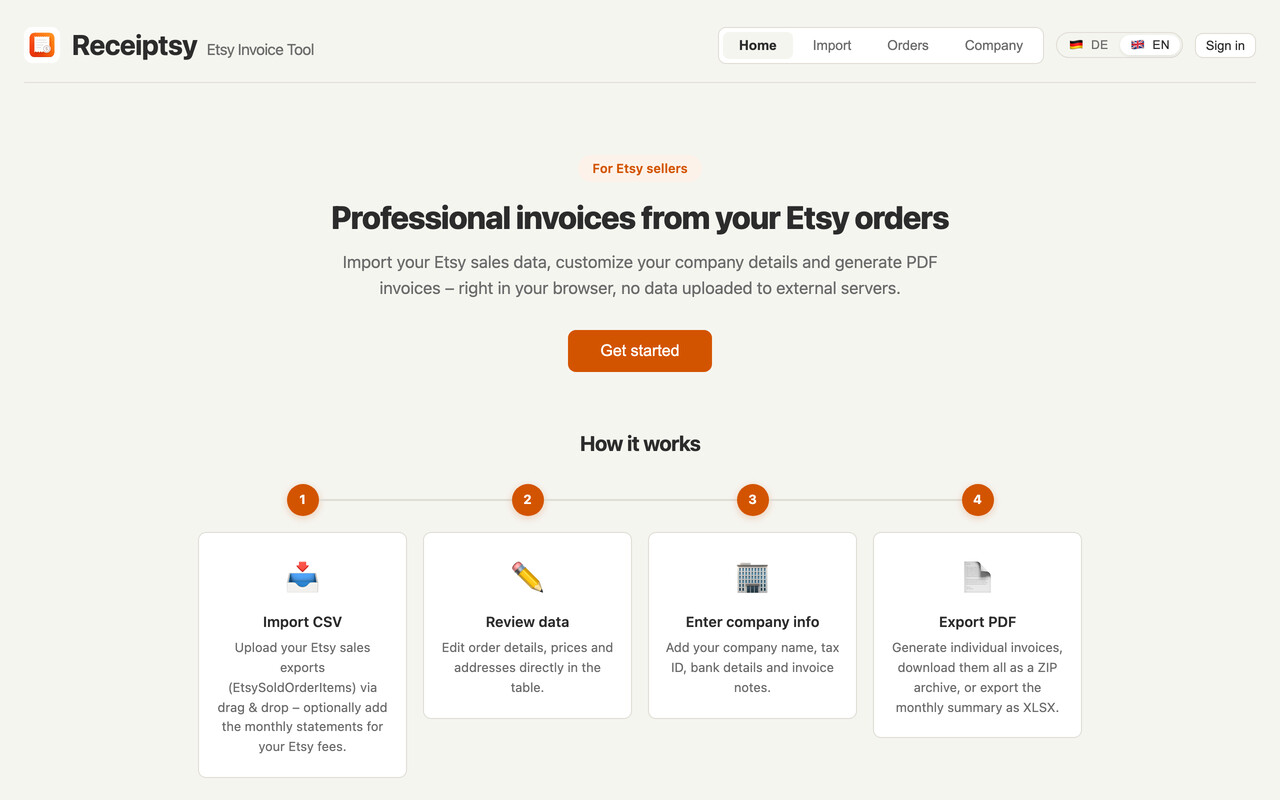
The result is Receiptsy, an invoice tool for Etsy sellers. The idea is as simple as the problem: you drop in your Etsy export, check the data briefly, enter your company details once - and out come finished PDF invoices. The CSV mess turns into a stack of documents.
All of it runs in the browser. No upload to somebody else's server, no queue, no sign-up before you even know whether the thing is any good. Every screenshot below comes from a local copy with anonymised sample data: made-up names, made-up addresses, made-up company details.
It starts with a drag-and-drop area. You pull your Etsy export files in, done. Several months at once are no problem: Receiptsy recognises what it already knows by transaction ID and skips duplicates. So you can drop the same export twice without the orders showing up twice in the list.
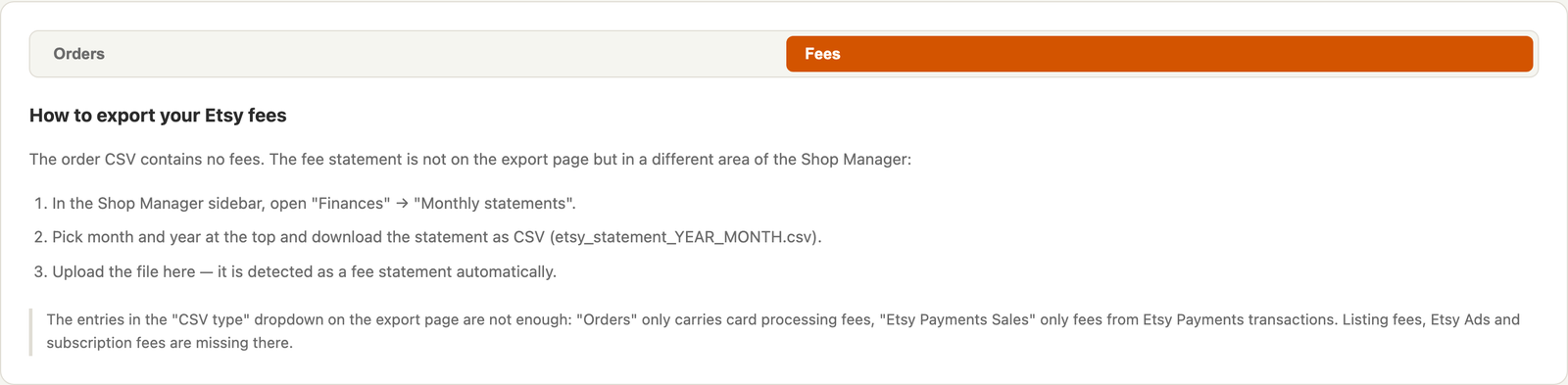
Because hardly anyone remembers where Etsy actually hides that export, the guide is built right in - including a screenshot of the right spot in the Shop Manager. And it covers both files you need, because that is the second trap: the order CSV contains no fee column whatsoever. Your Etsy costs - transaction fees, payment processing, listing fees, Etsy Ads, subscription - live in a completely different export, the monthly statement under "Finances". You can drop that one into the same area: Receiptsy detects from the file header which kind of file it is dealing with.
You enter who you are once: company name, address, contact details, tax number, VAT ID, bank details, optionally a logo and a free-text invoice note ("Thank you for your order!"). That is it - from then on it appears on every invoice.
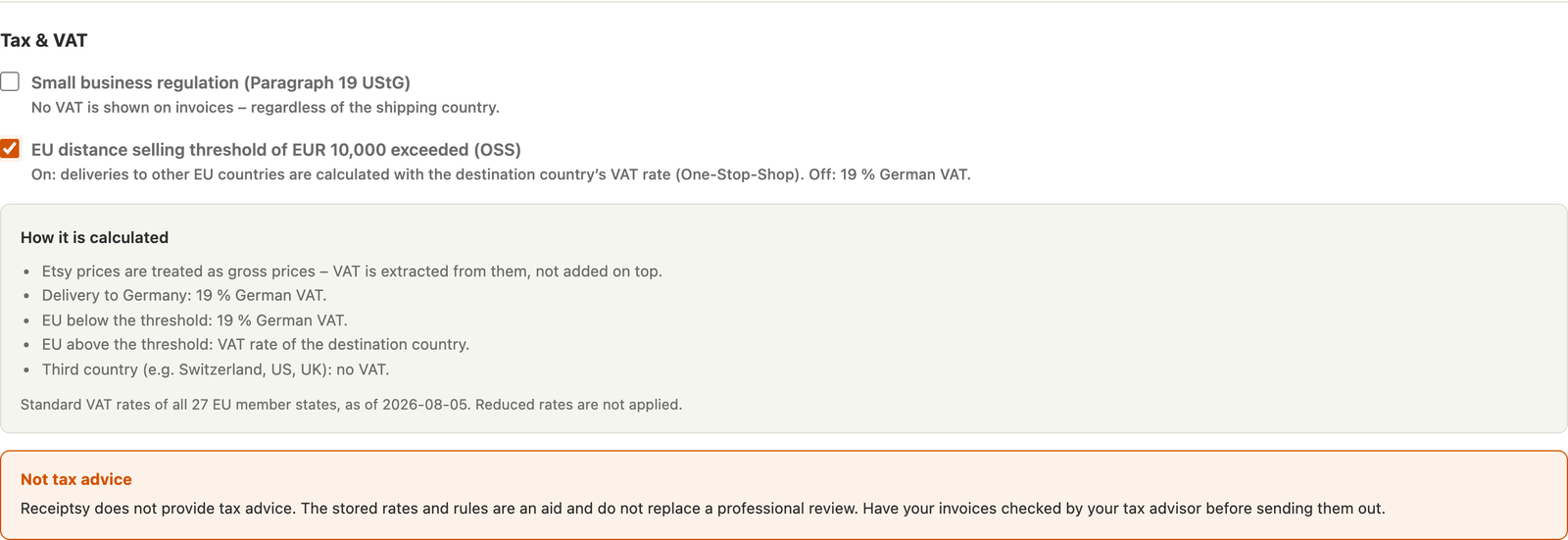
Tax-wise there are exactly two switches, and they decide everything. The first is the small business regulation. Turn it on and VAT is never shown, with the Paragraph 19 note appearing on the PDF automatically. The second is the EU distance-selling threshold: if you have crossed the 10,000 Euro mark and joined the OSS scheme, you switch it on - and from then on Receiptsy invoices deliveries to other EU states with the rate of the destination country. Leave it off and German 19 % applies. The standard rates of all 27 EU member states are built in, and right underneath it says honestly when that state of affairs was last checked.
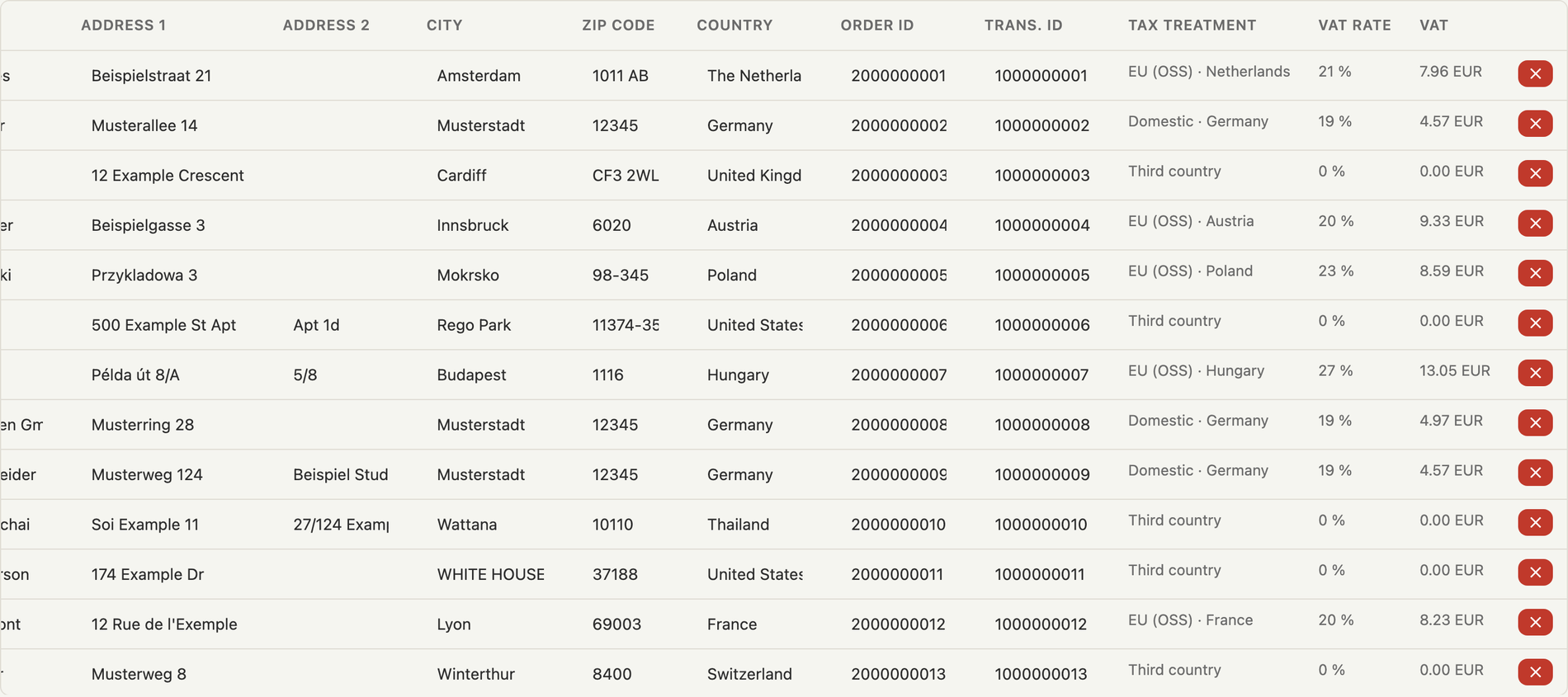
After the import you land in a table where every row is an order. Everything in it is editable: item name, quantity, price, discount, shipping, recipient, address. That matters more often than you would think - buyers mistype their address, or you want that 47-character Etsy title shortened on the invoice.
The genuinely interesting part, though, are the three columns on the far right: tax treatment, VAT rate and VAT amount. For every single row you can see how it was classified before you export anything. "Domestic · Germany" at 19 %, "EU (OSS) · Hungary" at 27 %, "Third country" at 0 % - traceable order by order. If an order has no delivery country, the cell is highlighted in red and a warning appears at the top, instead of silently assuming zero percent.
Above the table sits the invoice number configuration. Either sequential with a free prefix and an optional year (RE-2026-0001, RE-2026-0002, …), with the counter advancing automatically after every export. Or you use the Etsy order number directly as the invoice number if that makes matching easier for you. A small preview shows immediately what the next number will look like.
Now the part the whole thing exists for. You tick the orders you need and hit export. A single order comes out as a PDF, several as a ZIP archive with one file per invoice. For me, a good month is one click and a dozen finished documents.
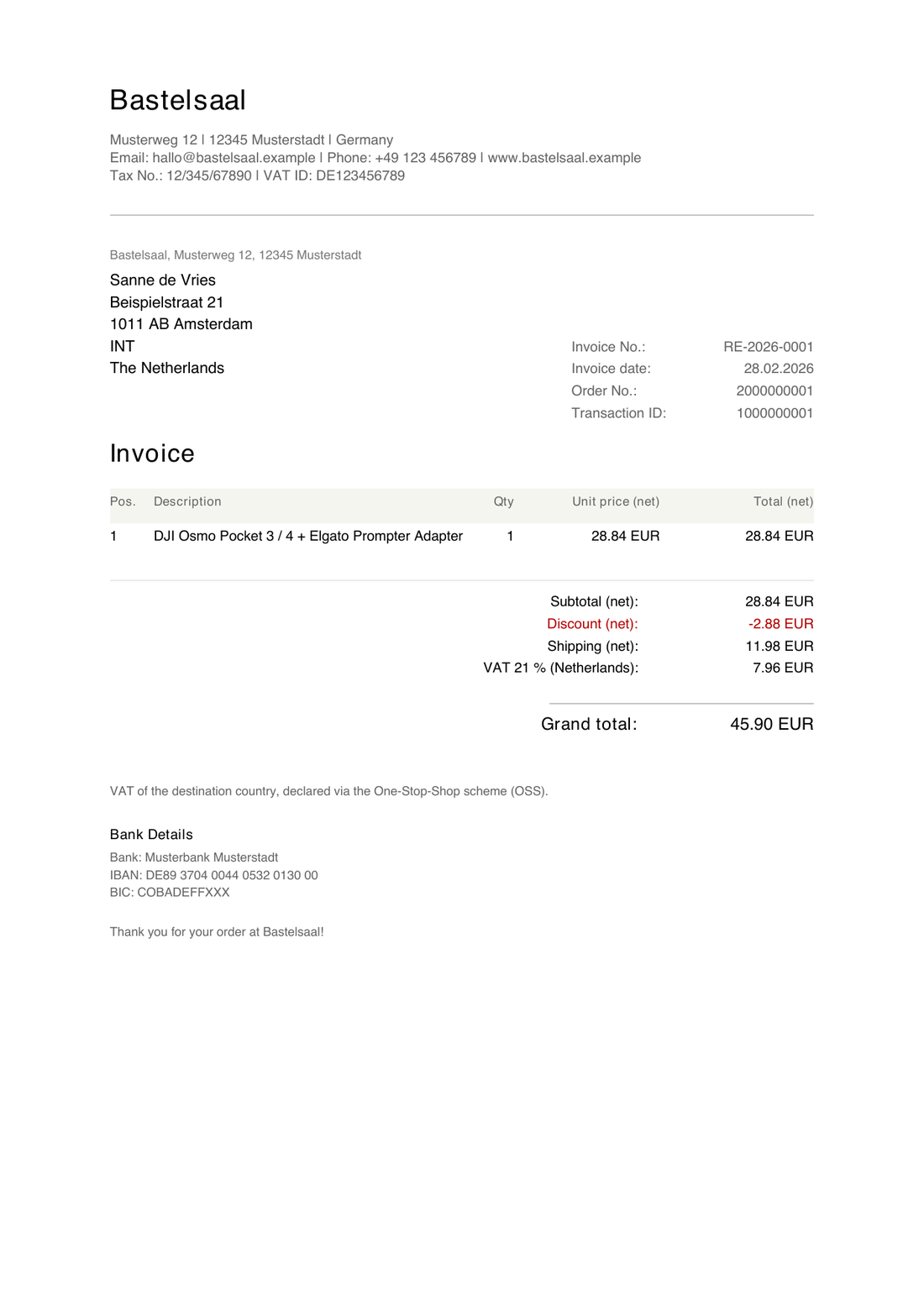
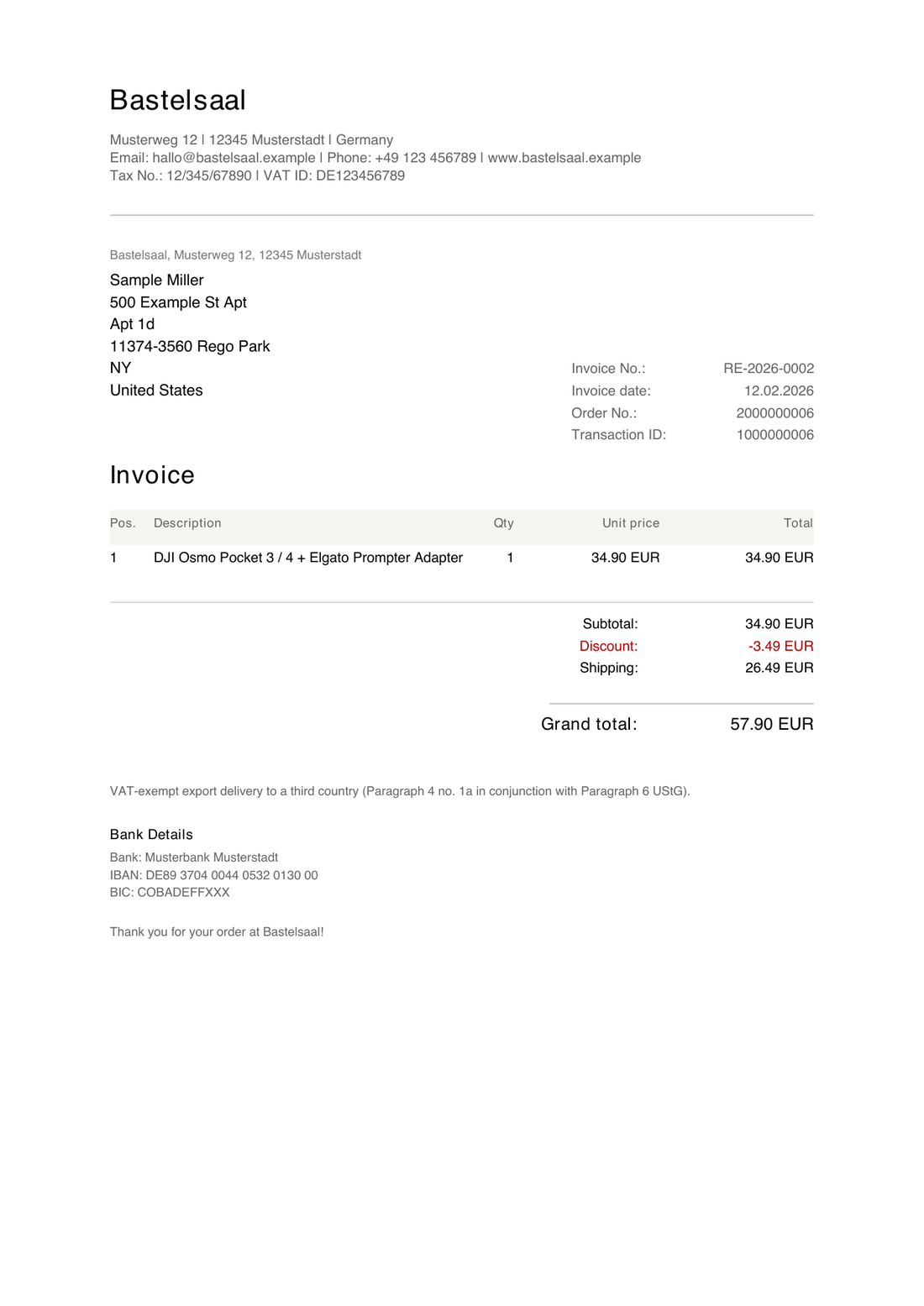
And this is where all that tax logic pays off, because the same template produces a different document depending on the delivery country. On the left the invoice to the Netherlands: net lines, 21 % Dutch VAT, and underneath the note about the One-Stop-Shop scheme. On the right the same order, but to the US: no tax line, instead the note about the tax-exempt export delivery under Paragraph 4 No. 1a in conjunction with Paragraph 6 UStG. Both without me doing anything, purely from the delivery country in the CSV.
The PDF carries everything an invoice needs: your letterhead with logo, the buyer's address, invoice number and date, plus the Etsy order number and transaction ID for matching, the line items with unit and total price, subtotal, discount, shipping, the tax line, the grand total, your bank details and your invoice note. If Etsy withheld sales tax for an order itself - which happens on US deliveries - it is passed through as its own line and kept cleanly separate from your VAT.
One detail that cost me more nerves than it should have: Etsy buyer names arrive in every script imaginable. Cyrillic, Greek, Japanese, Thai. The standard fonts in PDFs simply cannot render them, and you end up with gibberish in the recipient address. So before exporting, Receiptsy looks at which characters actually occur and loads a suitable font when needed.
What started as a pure invoicing tool picked up one more feature along the way that I now almost prefer to the invoices themselves: the monthly summary as XLSX. One row per month with gross revenue, net revenue and the Etsy costs from the monthly statement, plus a grand total. Exactly the numbers you need for your VAT return and for the conversation with your accountant - and exactly the numbers you would otherwise have to piece together from two different Etsy exports.
Two things mattered to me here. First, the summary always covers all imported orders, no matter what you have ticked in the list - a revenue report over a random subset would simply be wrong. Second: for months where no fee statement was imported, the cost column stays empty rather than showing zero. Missing data should not look like "no fees".
That was non-negotiable for me from day one. An Etsy export contains the full names and home addresses of your customers. You do not just upload that file somewhere. So Receiptsy processes everything locally in the browser: the CSV is parsed on your machine, the PDF is generated on your machine, the data sits in your browser's storage. No upload, no tracking, no cookies, no analytics. One click on "Delete all" and it is gone.
You do not need an account. There is one, but only if you want it: with the Pro version you can store your company details in the cloud so you have them on the laptop and on the machine in the workshop. The order data always stays local, even then. And because I dislike buying a pig in a poke myself, the first ten invoices are free - no sign-up, no crippled features. The interface and the generated PDFs come in German and English.
Technically Receiptsy is deliberately lean. The frontend is a single-page application built with React 19 and Vite 7, with ESLint 9 keeping it tidy. Deliberately without a UI framework and without a state management library: four tabs, one table and one form need neither Redux nor a component collection - React hooks and a single hand-written CSS file do the job.
The actual work is done by four small libraries, and all four run in the browser: Papa Parse reads the Etsy CSVs (including the quirks Etsy puts into the headers depending on the shop language), jsPDF draws the invoice line by line, JSZip packs the ZIP archive for the batch export, and FileSaver.js drops the result into your downloads folder. That is exactly why nothing has to be uploaded.
On the server side, almost nothing happens on purpose. Supabase provides Postgres, the sign-in and three edge functions that deal exclusively with account and subscription: start the checkout, receive the Stripe webhook, send auth emails. The whole thing is hosted on Vercel. Not a single order record or customer address ever touches any of those services - invoice generation happens entirely on your machine, which is why the thing still works when the Wi-Fi in the workshop takes another break.
And yes: a large part of it was written with AI assistance. Just like with the invoice tool for our house-building group, the hard parts were not the React components but the questions behind them: what is actually inside an Etsy export? Which tax rule applies to which country? And what happens when a field is empty? No model makes those decisions for you.
It says so inside the tool in several places, and I am happy to repeat it here: Receiptsy does not provide tax advice. The built-in rates and rules are an aid and do not replace a professional review. Reduced VAT rates, for instance, are deliberately not applied, because the Etsy export carries no information about which tax class a product falls into - only a human can decide that. Have your first invoices checked by your accountant before you send them out. After that it is one click.
Receiptsy grew out of my own very small Etsy shop. But the problem belongs to everyone selling there: Etsy hands you spreadsheets, the tax office wants documents, and in between you sit with a Word template. If that sounds familiar, just have a look - the first ten invoices cost nothing and you do not have to sign up for anything.
And if something is missing, if your case differs from mine, or if your export contains a constellation that breaks: write to me. Almost everything that has been added over the past months - the fee import, the monthly summary, the fonts for non-Latin names - exists because somebody tripped over exactly that spot. I am glad about every message.